Fashion eCommerce Web Design for Clothing & Lifestyle Stores
Create an online fashion store where customers can explore collections, compare styles and shop with confidence. WebDigiSoft designs fashion eCommerce websites with organised product catalogues, clear shopping journeys and layouts that bring your brand and products into focus.
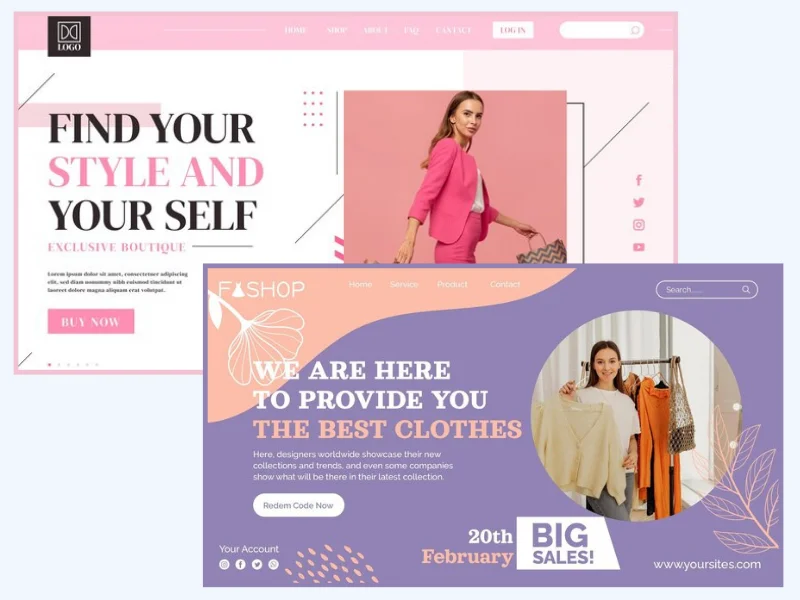
Turn Your Fashion Catalogue Into an Easy-to-Shop Online Store
Fashion customers often browse several products before deciding what to buy. They may compare styles, check available sizes and colours, review product images or look for delivery and return information. Your online store needs to make these details easy to find.
A fashion eCommerce website brings your collections, product information and shopping functions into one organised experience. It gives your brand a dedicated place to present new arrivals, seasonal ranges and popular products while helping customers move from browsing to ordering.
Fashion eCommerce Websites for Different Product Categories
The structure of a fashion store should reflect its products, collections and customer needs. We plan the catalogue and shopping experience around the type of merchandise you sell.
Clothing & Apparel Brands
Organise clothing ranges for men, women and children, with product pages that present available sizes, colours, fabrics and fit information.
Footwear Stores
Present shoes, sandals, boots and other footwear with clear size selections, product details and category navigation.
Fashion Accessories
Showcase bags, jewellery, belts, watches and accessories through organised product collections and detailed product displays.
Boutiques & Designer Labels
Build a distinctive store experience for boutique collections, designer pieces, limited ranges and brand-led product storytelling.
Multi-Category Fashion Stores
Bring clothing, footwear, accessories and other merchandise together through structured departments and collection pages.
Fashion Retailers Expanding Online
Give an existing retail business an online catalogue and ordering experience that complements its current sales channels.
Build an Online Store Around Your Products and Collections
From a focused boutique store to a larger fashion catalogue, the website should make it straightforward to discover products and understand what is available.
Fashion Collection Pages
Organise products into meaningful collections such as new arrivals, seasonal edits, occasion wear, everyday essentials and featured ranges.
COLLECTION DISCOVERYProduct Category Pages
Structure the catalogue into departments and product types so shoppers can browse without navigating through unrelated items.
CATALOGUE STRUCTUREDetailed Product Pages
Present product photographs, descriptions, pricing, material details, size information and available options in a clear layout.
PRODUCT INFORMATIONShopping Cart & Checkout
Provide a structured shopping flow for reviewing selected items, entering delivery details and completing an order through the configured payment method.
ORDER COMPLETIONOffers & Promotional Sections
Highlight selected ranges, seasonal promotions, discount offers and featured products without making the shopping experience cluttered.
MERCHANDISINGCustomer Account Features
Where required, include customer registration, sign-in, account details and order history through suitable eCommerce functionality.
CUSTOMER ACCOUNTSPresent Fashion Products With the Details Customers Need
Customers cannot physically inspect clothing or accessories when shopping online. Product pages should therefore provide useful information and clear images to help them understand what they are considering.
We plan product layouts around the information your store needs to communicate, including product options, descriptions, materials and availability.
Discuss Your Product CatalogueProduct Name & Description
Manage Sizes, Colours and Product Variations
Fashion products often have multiple options. The store should present these choices clearly and connect them to the correct product and stock information.
Size Selection
Provide size options such as XS, S, M, L and XL, or the relevant sizing system for your products.
Colour Options
Display available colours as selectable options where the product catalogue supports colour variations.
Variation Stock
Configure product variations with their own availability and stock details when required.
Size Guides
Include measurement charts and fit guidance to help customers understand product sizing.
Organise Products Into Categories Customers Understand
A well-organised catalogue helps customers move from a broad department to the products they want to explore. It also makes it easier for your team to maintain collections as products are added or discontinued.
Create a Clearer Online Shopping Journey
The shopping process should help customers understand their choices and complete an order without unnecessary steps or confusion.
Discover
Browse categories, collections and featured products.
Explore
Review product images, descriptions and specifications.
Select
Choose available sizes, colours and quantities.
Review
Check selected products and cart details before ordering.
Checkout
Enter delivery information and complete the configured payment process.
Manage Products, Orders and Store Information
A fashion store needs practical tools behind the customer-facing design. The management setup should make routine product and order updates straightforward for the people running the business.
Depending on the selected platform and project scope, the store can include product management, stock settings, order administration and customer communication features.
Explore WooCommerce Website DesignProduct Catalogue Management
Add products, update descriptions, organise categories and manage product variations.
Stock & Availability
Configure stock quantities and availability for products and supported variations.
Order Administration
Review incoming orders and manage order statuses through the selected eCommerce platform.
Shipping Configuration
Set up relevant shipping zones, delivery methods and charges based on your business rules.
Customer & Order Information
Access relevant order and customer details through the store administration area.
Configure Payments, Shipping and Store Policies
Customers need to understand how they can pay, when products may arrive and what to expect if they need to return an item. These details should be easy to locate before checkout.
Payment Gateway Integration
Connect suitable payment providers to accept supported online payment methods, subject to provider approval and account setup.
Shipping & Delivery Options
Configure delivery zones, shipping charges and available fulfilment options according to your store’s delivery arrangements.
Returns & Exchange Information
Present your return, exchange, cancellation and refund policies in clear pages or sections that customers can review.
Payment gateway accounts, shipping provider services, transaction fees, courier contracts and policy decisions are separate business requirements. Their configuration and any third-party charges should be confirmed before development.
the details.COLLECTION / 01
visual direction
Make Your Online Store Feel Like Your Fashion Brand
Your website is part of the way customers experience your label. The colours, typography, photography and layout should work together to create a recognisable presentation.
Whether your brand is minimal, contemporary, premium, casual or trend-focused, the visual approach should complement the products rather than compete with them.
Design for Customers Browsing on Mobile and Desktop
Fashion shoppers may discover products on a phone, compare options on a tablet or complete an order later from a desktop. The store should present product information and shopping controls clearly across these screen sizes.
We plan responsive layouts for category pages, product images, variation selectors, navigation and checkout elements so the experience remains practical on smaller screens.
your style.
Build a Manageable Fashion Store With WooCommerce
WooCommerce adds eCommerce functionality to WordPress and can support product catalogues, product variations, shopping carts, checkout and order management.
For fashion retailers, it can provide a flexible foundation for organising clothing, footwear and accessory products. The final setup depends on the catalogue size, required features and integrations.
View WooCommerce Website DesignProduct Management
Organise products, categories and variations.
Shopping Functions
Configure cart and checkout workflows.
Order Management
Review orders and update their status.
Store Integrations
Extend functionality with suitable plugins and services.
Help Customers Discover Your Fashion Products Through Search
A fashion store should make its product categories and individual items understandable to both visitors and search engines. Useful product information and logical catalogue organisation provide a stronger foundation for organic discovery.
Explore SEO ServicesDescriptive Category Pages
Use meaningful category names, page titles and supporting descriptions that explain the products within each department.
Useful Product Descriptions
Include relevant product details such as material, fit, measurements, colour and care instructions where applicable.
Clear Product URLs & Navigation
Maintain logical category structures, descriptive links and navigation paths between related products and collections.
Image Optimisation
Use appropriately sized product images, descriptive file names and meaningful alternative text where images convey product information.
Technical eCommerce Foundations
Consider mobile usability, crawlable product links, page performance and suitable structured data as part of the store’s technical setup.
Our Fashion eCommerce Website Development Process
We plan the store around your products, brand presentation and selling requirements before moving into design and development.
Understand Your Store
Discuss your fashion category, audience, product range and business requirements.
Plan the Catalogue
Organise categories, collections, product attributes and the main shopping journey.
Design the Experience
Develop the visual direction, product layouts and responsive page designs.
Develop the Store
Build the agreed pages and configure products, variations and store functionality.
Test & Launch
Review product selection, cart, checkout, responsive layouts and agreed integrations.
Why Choose WebDigiSoft for Fashion eCommerce Web Design?
A fashion store has to present products attractively while supporting the practical steps involved in online shopping. Our approach brings the visual presentation, catalogue structure and required store functionality together in one project plan.
Learn More About WebDigiSoftBrand-Led Design
Layouts planned around your label, products and preferred visual direction.
Organised Product Structure
Clear categories, collections and product information for easier browsing.
Practical Store Functionality
Product options, cart, checkout and other features based on your requirements.
Responsive Shopping Experience
Store layouts designed to work across mobile, tablet and desktop screens.
Fashion eCommerce Website Design FAQs
Find answers to common questions about building, managing and expanding an online fashion store.
What is included in fashion eCommerce website design?
The project can include store planning, custom page design, product categories, collection pages, product detail layouts, shopping cart, checkout and agreed payment or shipping integrations. The final scope depends on your catalogue and business requirements.
Can you build an online clothing store with size and colour options?
Yes. Product variations can be configured for available sizes, colours and other product attributes. Each variation can have its own price, stock and availability settings where supported by the selected eCommerce platform.
Can I sell clothing, footwear and accessories on the same website?
Yes. A single fashion store can organise different product departments through categories and collections. The navigation and catalogue structure can be planned around the range of products you sell.
Can customers filter products by size, colour and price?
Suitable product filters can be added to help customers narrow a catalogue by attributes such as size, colour, category and price. The available filters depend on how the products and their attributes are configured.
Can I manage products and stock myself?
Yes. With a suitable WooCommerce setup, authorised store users can add products, edit descriptions, manage variations and update stock information through the administration dashboard.
Can you integrate online payment gateways?
Yes. Suitable payment gateways can be integrated according to your target market, business account and preferred payment methods. Gateway approval, transaction fees and provider requirements are separate from the website design work.
Can you add shipping and delivery options?
Shipping zones, delivery methods and charges can be configured according to your fulfilment arrangements. More advanced courier integrations or automated shipping workflows may require additional services or development.
Can my fashion store include sale and new-arrival sections?
Yes. Dedicated sections can highlight new arrivals, discounted products, seasonal collections, featured items and other product groups. These sections can be updated as your catalogue changes.
Is WooCommerce suitable for a fashion eCommerce website?
WooCommerce can be suitable for fashion stores that need product categories, variations, cart and checkout functionality with WordPress content management. Its suitability depends on your catalogue size, operational requirements and integrations.
How much does a fashion eCommerce website cost?
The cost depends on the number of products, catalogue structure, design requirements, product variations, payment and shipping integrations and any additional functionality. Share your requirements to receive a project-specific estimate.
How long does it take to build a fashion online store?
The timeline depends on the store’s size, number of products, content readiness, design complexity and integrations. A clear product catalogue and prepared product images can help the project move through development and review more efficiently.
Can you redesign an existing fashion eCommerce website?
Yes. An existing store can be reviewed for product presentation, catalogue navigation, mobile usability, checkout flow and technical requirements. The redesign plan will also consider the current platform and any existing product or order data that needs to be retained.
Build a Fashion Store That Brings Your Products and Brand Together
Tell us about your product range, store requirements and the shopping experience you want to create. We can discuss the right design, catalogue structure and eCommerce functionality for your fashion business.
Tell Us What You Want to Sell Online
Whether you are launching a clothing label, expanding a boutique or organising a larger fashion catalogue, share your requirements with us. We can discuss the pages, product options and store features needed for your project.
Discuss your product catalogue, store platform, payment options, shipping requirements and preferred design direction.
Request a Fashion eCommerce Website Consultation
Share your store requirements and our team can get in touch.