Hospital Website Design for Modern Healthcare Institutions
Give patients, families and visitors a clearer way to understand your hospital. WebDigiSoft designs professional hospital websites that organise departments, introduce medical teams, present facilities and make essential information easier to find.
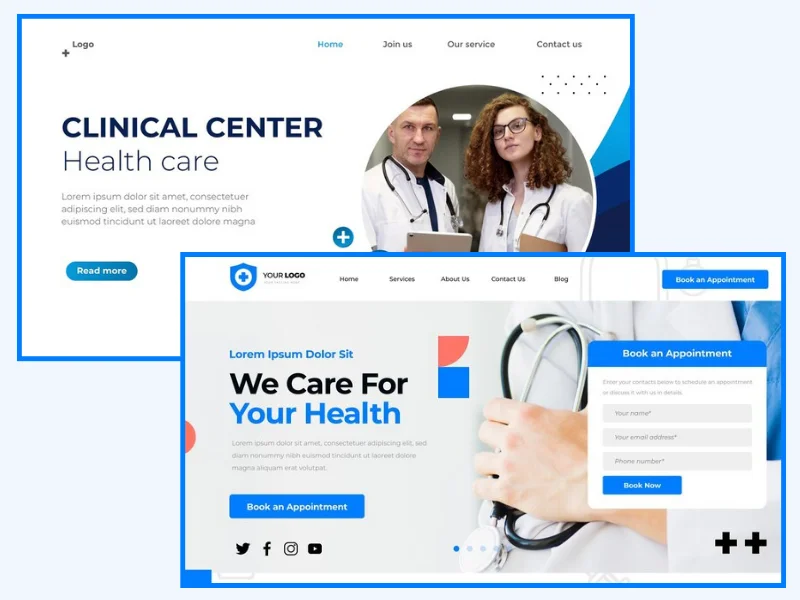
A Hospital Website Should Make Important Information Easy to Find
A hospital website serves many audiences at once. People may visit to explore medical departments, understand available facilities, find a consultant, check visiting information or contact the hospital. If these details are difficult to navigate, visitors may struggle to find the information they need.
Our hospital website design services focus on organising this information into a clear, accessible and professional online experience. We plan the website around your hospital’s structure, specialities, locations and communication requirements, so visitors can move between important sections without unnecessary confusion.
Website Solutions Built Around Hospital Operations
From a single-location medical centre to a multi-specialty hospital, the website structure should reflect the organisation’s services and how people look for information.
Hospital Website Design
A professional website that introduces your hospital, explains its services and gives visitors a clear overview of the organisation.
Department and Speciality Pages
Dedicated pages for medical departments, specialities, treatments and related facilities, organised with consistent navigation.
Doctor Profile Sections
Structured consultant profiles displaying approved qualifications, specialities, professional experience and consultation information.
Facilities and Infrastructure Pages
Present hospital facilities, diagnostic departments, patient amenities and other services through organised content and relevant images.
Hospital Location Information
Help visitors identify hospital branches, addresses, contact numbers, directions and location-specific information.
Appointment Enquiry Options
Provide clear enquiry forms and contact paths for people who want to ask about consultations or appointment procedures.
Organise Hospital Departments Into Easy-to-Navigate Pages
Visitors often arrive with a specific department or medical speciality in mind. A well-planned hospital website should make these sections easy to locate from the main navigation and relevant internal links.
We can organise department pages around the information your hospital wants to publish, including speciality descriptions, available services, consultant details and relevant contact information.
- Individual department landing pages
- Medical speciality descriptions
- Related doctor and consultant profiles
- Links to relevant facilities and services
- Consistent navigation across departments
Illustrative department layout. Actual departments depend on the hospital.
Present Your Medical Team With Clear, Consistent Profiles
Patients and families may want to learn about a consultant before contacting a hospital. A dedicated doctor directory can make relevant professional information easier to browse.
We design profile layouts that can display the details your hospital provides and approves, while keeping the presentation consistent across departments.
Discuss your website requirementsIllustrative profile layout. Names, photographs, qualifications and professional information must be supplied and approved by the hospital.
Explain What Your Hospital Offers
Give visitors a structured overview of the facilities and services available at your hospital. Dedicated pages can provide more detail than a single long list on the homepage.
Diagnostic Services
Present available diagnostic departments and relevant service information.
Patient Facilities
Explain available rooms, patient amenities and approved facility details.
Imaging and Radiology
Organise information about imaging services and related departments.
Emergency Information
Make hospital-approved emergency contact details and relevant instructions easy to locate.
Patient Support Services
Describe visitor guidance, support facilities and other relevant services.
Timings and Visitor Information
Display approved visiting hours, enquiry timings and practical visitor information.
The website content should reflect the hospital’s actual facilities and operating policies. WebDigiSoft does not create or verify medical service claims.
Create Clear Website Journeys for Patients and Visitors
Different visitors arrive with different questions. A useful hospital website helps them move from a general enquiry to the right information without making them search through unrelated pages.
Find a Department
Visitors can explore the hospital’s departments and identify the relevant speciality page.
Explore Consultants
Relevant profiles help visitors review approved professional details and consultation information.
Understand Facilities
Dedicated sections explain hospital facilities, locations, timings and visitor information.
Make an Enquiry
Clear contact options help visitors reach the appropriate hospital team for further information.
Make It Easier for Visitors to Contact the Hospital
Contact information should be visible and consistent across the website. Depending on the hospital’s requirements, we can include enquiry forms, department contact details, telephone links and clear directions to the relevant contact page.
- General hospital enquiry forms
- Department-specific contact options
- Click-to-call telephone links
- Appointment enquiry instructions
- Location and contact information
Standard enquiry forms should not request medical records, diagnoses or other sensitive patient health information. Patient portals, clinical systems and specialised appointment platforms require separate planning and appropriate security review.
How can we direct your enquiry?
A simple example of a general contact form layout.
Present Hospital Branches and Locations Clearly
Hospitals operating from multiple locations need a practical way to distinguish each branch. Separate location pages can display the correct address, contact information, facilities and directions for each site.
- Individual branch information pages
- Location-specific contact details
- Embedded maps where required
- Links to relevant departments and facilities
Manage Hospital Website Content Through WordPress
Hospital information changes over time. Departments may be updated, consultants may join or leave, and visitor information may need revision. A content management system helps authorised staff maintain the website without rebuilding every page.
We can develop hospital websites using WordPress with organised page layouts and editable content sections suited to the agreed requirements.
- Editable department and speciality pages
- Manageable doctor profile content
- Updates to facilities and announcements
- Structured navigation and page templates
- Content management guidance
A Consistent Experience Across Mobile, Tablet and Desktop
People may look for hospital information while travelling, at home or when helping a family member. The website should remain easy to read and navigate across different screen sizes.
Our responsive layouts adapt page content, navigation, images and contact options to different devices. Important information such as department links, location details and telephone numbers should remain accessible on smaller screens.
Explore responsive web designBuild a Clear Foundation for Hospital Website Content
Search engines need to understand how the hospital’s pages relate to its services and locations. Visitors also benefit when each page has a clear purpose and useful information.
Additional Hospital Website Features Can Be Planned Around Your Needs
Some hospitals need more than standard information pages. Additional functionality can be evaluated according to the organisation’s workflows, existing systems and technical requirements.
Multi-Language Content
Present key hospital information in multiple languages where required, with content supplied and reviewed by the hospital.
Appointment System Integration
Explore integration with an existing appointment platform or a separately scoped booking solution.
Patient Information Resources
Organise approved visitor guides, general instructions, downloadable documents and hospital announcements.
Third-Party Integrations
Connect suitable external tools or systems after reviewing compatibility, access requirements and project scope.
News and Announcements
Publish hospital updates, events, public notices and approved informational content.
Analytics Setup
Configure suitable website analytics to help the organisation understand general website usage and content engagement.
How We Plan and Build a Hospital Website
A structured process helps keep the website aligned with the hospital’s departments, content requirements and intended visitor experience.
Requirement Discussion
Understand the hospital’s locations, departments, audience, existing website and required functionality.
Website Structure and Planning
Prepare the sitemap, navigation, page hierarchy and content requirements for the main hospital sections.
UI/UX Design
Develop the visual direction and page layouts for the homepage, department pages, doctor profiles and other key sections.
Website Development
Build the agreed pages, implement responsive layouts and configure approved forms or integrations.
Content Review and Testing
Review supplied hospital information, navigation, forms and responsive behaviour before launch.
Launch and Handover
Prepare the approved website for launch and provide guidance on managing editable website content.
A Practical Approach to Hospital Website Design
Hospital websites need a balance of professional presentation, organised information and dependable functionality. Our approach starts with understanding the organisation and the information its visitors need to access.
Structured Information
Department, consultant and facility pages planned around the hospital’s organisation.
Purposeful Design
Layouts that give important hospital information a clear visual hierarchy.
Responsive Development
Consistent navigation and readable content across mobile, tablet and desktop screens.
Content Management
WordPress-based content management options for agreed editable website sections.
Search-Friendly Foundations
Logical page structures and relevant content organisation to support search discovery.
Clear Project Communication
Defined requirements, review stages and discussions about additional functionality.
Give Your Hospital a Website That Organises Information Clearly
Tell us about your hospital, departments, locations and website requirements. We can discuss a suitable design and development approach for your organisation.
Frequently Asked Questions
Answers to common questions about hospital website design, development, functionality and project planning.
What is included in hospital website design services?
Hospital website design can include homepage design, department and speciality pages, doctor profiles, facility information, location pages, contact forms and responsive layouts. The exact scope depends on the hospital’s requirements and the features agreed for the project.
How much does it cost to design a hospital website?
The cost depends on the number of pages, design requirements, content volume, doctor directories, number of locations and additional functionality. A hospital website with several departments and custom integrations requires a different scope from a smaller medical centre website. Share your requirements to receive a project estimate.
Can you design a website for a multi-specialty hospital?
Yes. A multi-specialty hospital website can be organised with separate department pages, consultant profiles, facility information and location sections. The navigation and page structure can be planned around the hospital’s actual departments and services.
Can each hospital department have its own page?
Yes. Individual department pages can explain the speciality, available services, related consultants and relevant contact information. This makes the website easier to navigate and gives each department a dedicated place for approved information.
Can you add doctor profiles to a hospital website?
Yes. Doctor profile sections can display approved photographs, names, qualifications, specialities, professional details and consultation information. The hospital should provide and verify all professional details before publication.
Can patients request appointments through the website?
A website can include appointment enquiry forms or integrate with an existing appointment platform, depending on the project scope. A standard enquiry form is not the same as a complete appointment management system, so scheduling, confirmations and related workflows should be discussed separately.
Can you develop a hospital website using WordPress?
Yes. WordPress can be used to build a hospital website with editable pages, department sections, doctor profiles, news updates and other agreed content areas. The editing structure can be planned to help authorised staff maintain website information.
Will the hospital website work on mobile devices?
Yes. Responsive design adapts the website layout to mobile phones, tablets and desktop screens. Navigation, page content, images and contact options are planned to remain usable across different screen sizes.
Can you build a website for hospitals with multiple branches?
Yes. The website can include separate pages for each hospital location, with relevant addresses, contact information, facilities and directions. The structure can also connect each location to the departments and services available there.
Can a hospital website include a patient portal?
A patient portal is a separate application or system that may involve personal and sensitive health information. It is not a standard feature of a hospital information website. Any such requirement needs separate planning, suitable technical controls and a review of applicable privacy and security obligations.
How long does it take to develop a hospital website?
The timeline depends on the number of pages, design complexity, content readiness, number of departments and required integrations. A clear sitemap and timely approval of hospital content help keep the project organised. A realistic timeline can be discussed after reviewing the requirements.
Can you redesign an existing hospital website?
Yes. An existing hospital website can be reviewed for navigation, content organisation, mobile usability, visual design and technical structure. The redesign plan can retain useful content while improving the way visitors find departments, doctors, facilities and contact information.
Discuss Your Hospital Website Requirements
Whether you are planning a new hospital website or improving an existing one, share the details of your organisation and the features you need.
For an accurate estimate, mention the number of hospital locations, departments, approximate page count and any required integrations.
Let’s discuss your hospital website
Share your project details and our team can review your requirements.